
Binance Tax Made Easy: Generate Your Tax Reports in Minutes

TL;DR Breakdown

  • Binance Tax supports up to 100,000 transactions on the Binance platform. In the future, you will be able to import transactions from other wallets and blockchains into Binance Tax.
  • Note that Binance Tax currently does not support transactions related to certain Binance products, such as Futures and NFTs. You can add these transactions manually or take them up elsewhere on your tax return.
  • Currently, each user can generate a Capital Gain Report, Income Gain Report, or a report of all their transactions in the 2022 tax year.

For many crypto users, filing taxes can be a confusing, cumbersome, and time-consuming procedure, and Binance Tax aims to eliminate this financial obstacle. If you’re struggling to remain on top of your crypto taxes or simply want to expedite the process, be sure to check out Binance Tax, our recently released crypto tax calculator. 

Globally, crypto taxation regulations are constantly evolving. Binance recognizes that, as a result, many of the users, including seasoned traders, find submitting their taxes to be difficult and time-consuming. The Binance Tax tool aids you in keeping track of your crypto-related tax obligations and provides a variety of tangible benefits. 

Binance Tax: What is it?

Binance Tax is a new, free service that calculates your crypto tax obligations. The Binance Tax tool allows you to view and edit your transactions and generate your tax report for the AY 2022.

Binance Tax is voluntary for the majority of users. It is merely a tool that can be used to free money. Binance Tax can be used to compute your tax obligations for transactions executed on the Binance platform. In the future, Binance Tax will encompass additional blockchains, exchanges, and wallets.

The Binance Tax Assistant gives precise information on your transactions inside our ecosystem to assist you in filing your taxes, including but not limited to: spot trades, crypto donations, and even blockchain fork prizes.

Binance Tax supports popular cost basis methodologies such as First-In-First-Out (FIFO), Last-In-First-Out (LIFO), and Average Cost Basis. It will provide you a summary of your gains and losses based on the technique you chose. 

Binance Tax currently only provides country-specific tax standards for France and Canada. For other jurisdictions, Binance Tax employs generic tax rules to help you determine crypto-related capital gains, losses, and income. Your report on capital gains will include the acquisition date, the sale date, the sales proceeds, the cost basis, the gains, the holding period, and the transaction type. 

Likewise, your report of income gains will include both income gains and transaction type. We recommend consulting with a tax expert to determine if country-specific rules, additions, or exclusions apply to the below default treatment.

A step-by-step guide on how to set up Binance Tax

Step 1: Visit the Binance Tax Tool. Click [Get Started] and log in to your Binance account.
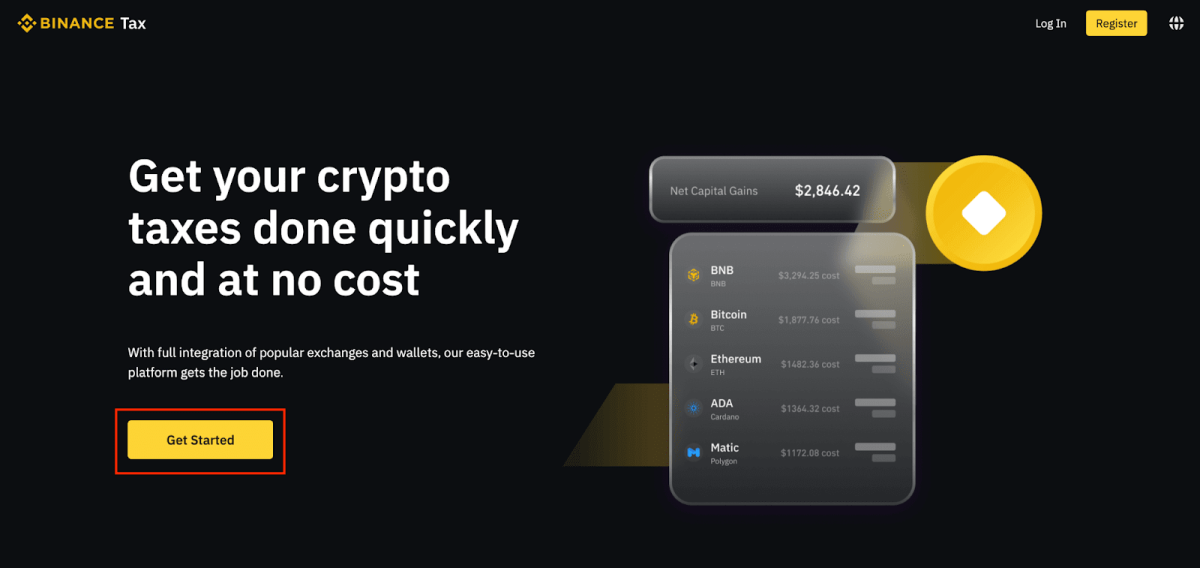
image 1026Binance Tax Made Easy: Generate Your Tax Reports in Minutes
image 1026

Step 2: If you are using the tool for the first time, you will be required to select your tax jurisdiction and cost basis method. The information required could vary depending on the country. To save, click [Confirm].  You can change these settings later by going to [Profile] – [Account setting].
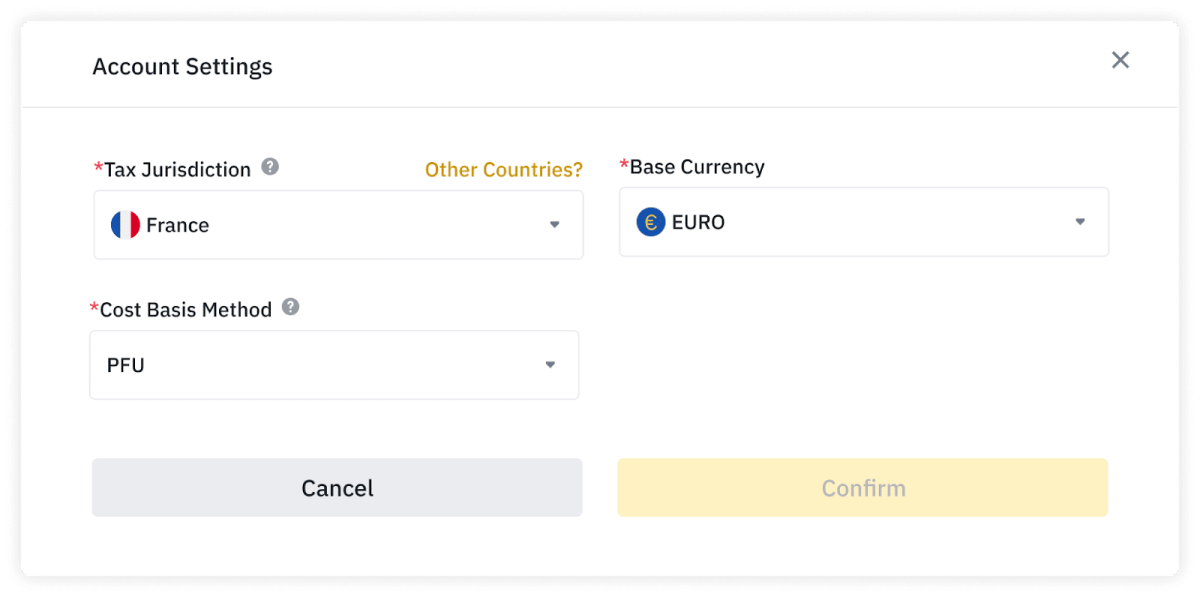
image 1023Binance Tax Made Easy: Generate Your Tax Reports in Minutes
Source: Binance

Step 3: View your Binance transactions

Binance Tax will start importing your transactions into the software. This usually takes a couple of hours, but it could take longer if there is a significant volume of transactions. You will be contacted via email once your data has been imported.

After you import your transactions, you will see all of your Binance transactions in the tax tool. The transactions can be filtered by category, currency, and date. You can either alter or disregard a transaction, or you can manually add a new one.
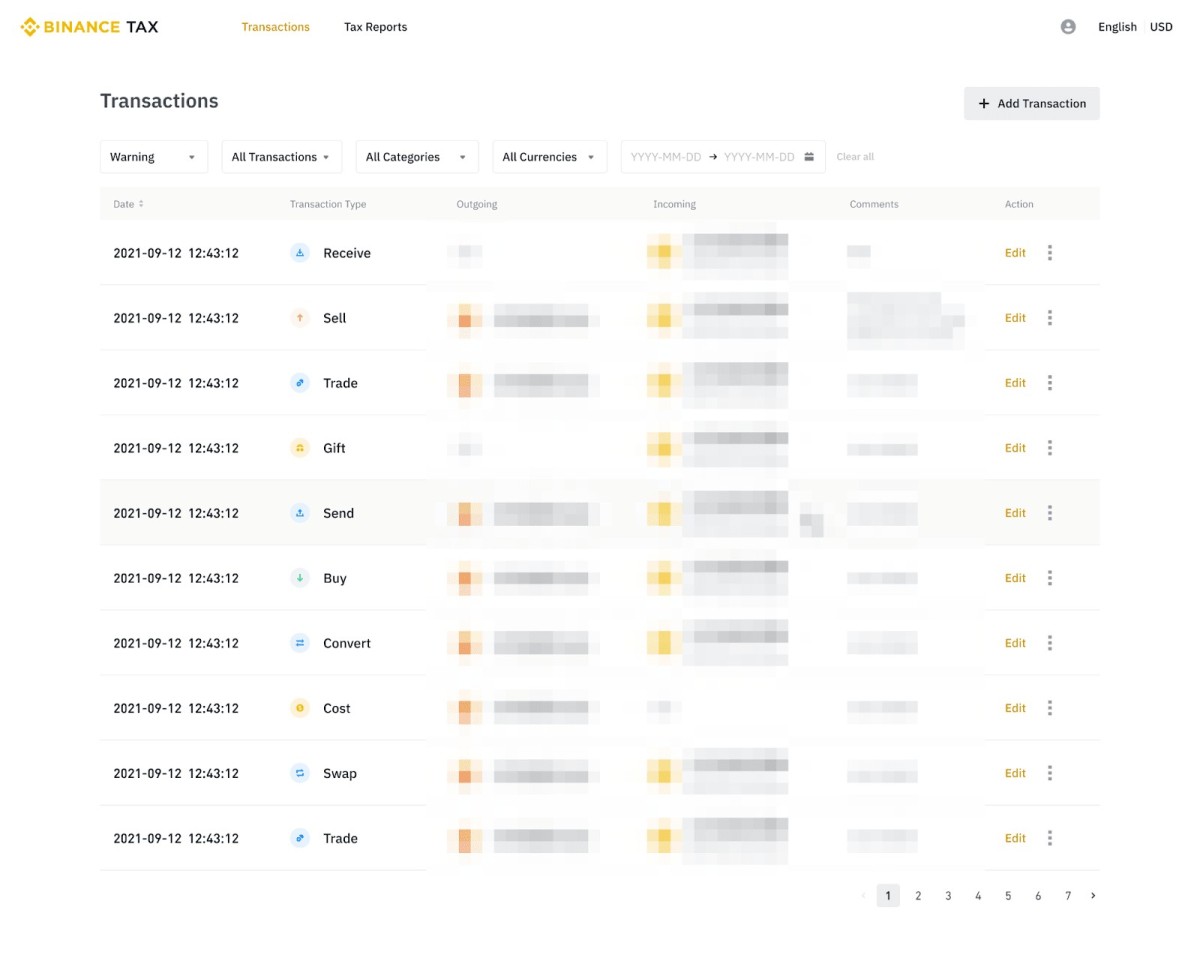
image 1027Binance Tax Made Easy: Generate Your Tax Reports in Minutes
Source: Binance

Here is how to generate and download your tax report

Step 1. Click [Tax Reports] at the top.

Step 2: Below is a summary of your tax reports, a summary of your capital and income gains, and your transaction history. Select the type of report you want to create and then click [Generate].

Your Capital Gains and Income Gains report may not include specific tax calculation regulations in your country of residence, depending on your tax jurisdiction. If this is the case, you will be notified while utilizing Binance Tax. Before submitting your taxes, you should confirm the gains/losses computations with an independent tax specialist.

Step 3: Read and agree to the disclaimer and click [Generate].

Step 4: Your request will be processed, and you will be notified once it’s ready.

Step 5: To download your report, click [Export History].
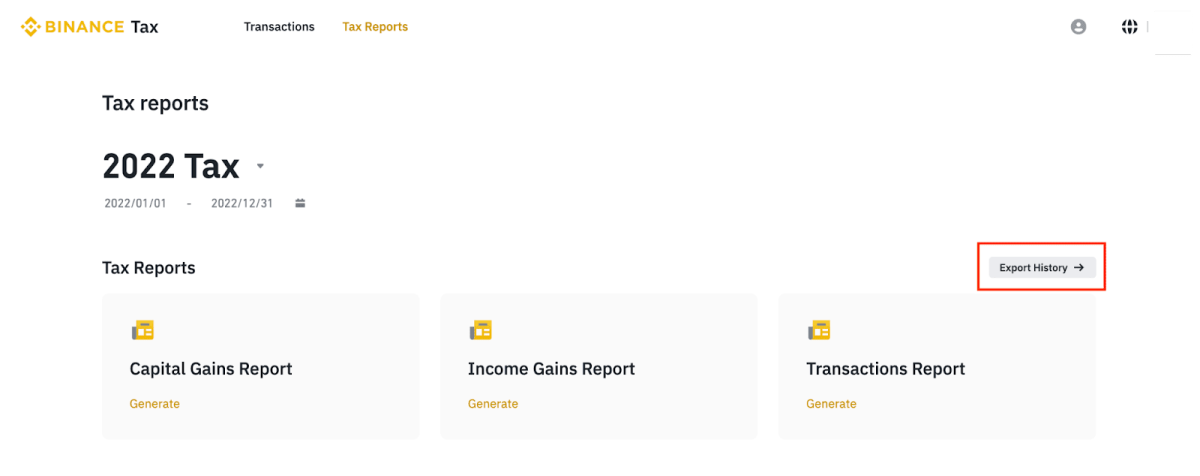
image 1022Binance Tax Made Easy: Generate Your Tax Reports in Minutes
Source: Binance

Step 6: You will see a list of the available reports. Click [Download] next to the one you want to download, and a CSV file will be saved to your computer.

Here is how you can edit, ignore or add a transaction

While editing: Here is what to do:

Step 1: Click [Edit] next to the transaction you want to edit.

Step 2: You can only edit certain details of the transaction. For example, for a buy transaction, you can only edit the fee amount, fee net worth, and comment. Click [Confirm] to save your changes.

Step 3: You will be notified once the transaction is edited. Please note that your taxes may be recalculated after editing a transaction.

While Ignoring a Transaction: Here is what to do

Step 1: Click […] next to the transaction and click [Ignore transaction].

Step 2: . Click [Confirm] on the pop-up.

Step 3: 3. The ignored transaction will be crossed and grayed out. Please note that you cannot edit the ignored transaction. If you want to include the transaction again, click […] – [Include transaction].
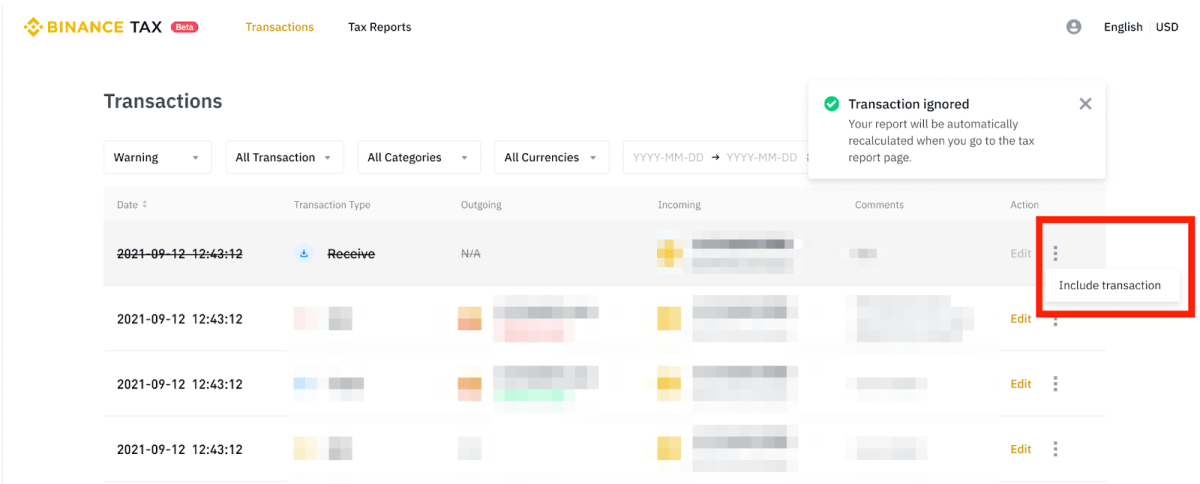
image 1025Binance Tax Made Easy: Generate Your Tax Reports in Minutes
Source: Binance

While adding a transaction – here is how to go about it

Note that you can also add transactions conducted outside of Binance to Binance Tax. Step 1 Click [+ Add Transaction].

Step 2; Select the transaction type (buy, sell, trade, send, convert, transfer, cost, deposit, withdraw). Then, choose the date and time of the transaction and enter the details. You may also add a comment for your own reference. Click [Confirm].

Step 3: You will be notified once the transaction is successfully added.
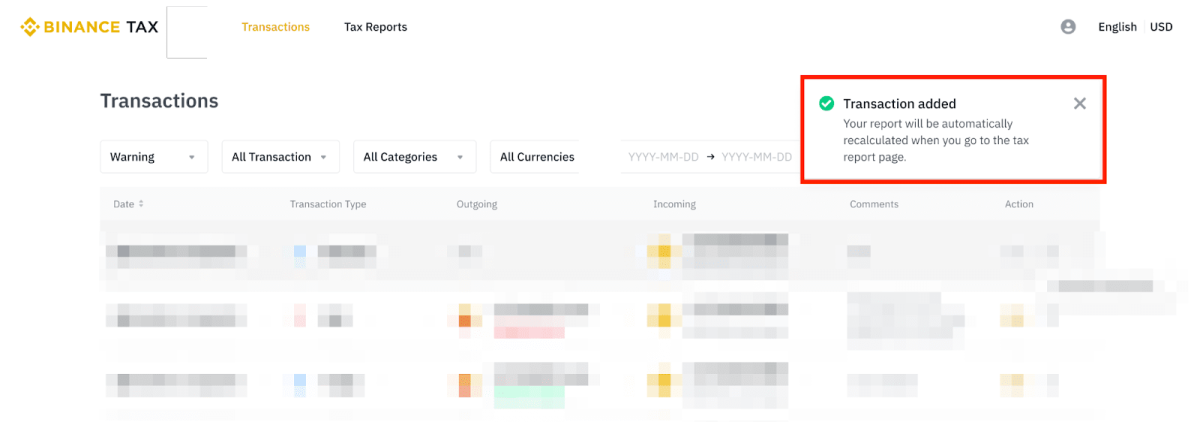
image 1024Binance Tax Made Easy: Generate Your Tax Reports in Minutes
Source: Binance
Disclaimer. The information provided is not trading advice. Cryptopolitan.com holds no liability for any investments made based on the information provided on this page. We strongly recommend independent research and/or consultation with a qualified professional before making any investment decision.

文章来源于互联网:Binance Tax Made Easy: Generate Your Tax Reports in Minutes

Disclaimers:

1. You are solely responsible for your investment decisions and this info is not liable for any losses you may incur.

2. The copyright of this article belongs to the writer, it represents the writer's opinions only, not represents the site's ones. Not financial advice.

Previous 2023年6月1日 15:08
Next 2023年6月1日 16:01

Related articles

  • Arbitrum price analysis: Uptrend remains preserved as price safely rejoins $1.16

    TL;DR Breakdown The Arbitrum price analysis validates bullish dominance. The bulls have taken price above $1.16. Support is sufficient at $1.04 level. The Arbitrum price analysis reveals that the uptrend has been intact as the bulls have been trying to maintain their lead despite a very low price oscillation. The bullish momentum lacks spark, but at least the trend has been saved from reversing until now, which is why the price has been slightly uplifted to the $1.16 level. This counts as an accomplishment for the buyers, as previously the chances of progression were quite limited. ARB/USD 1-day price chart: Bullish momentum continues as the price recovers slowly The 1-day price chart for Arbitrum price analysis shows the cryptocurrency price has been advancing at a slow pace for the past two weeks, which is a moment of encouragement for the buyers. The price has been elevated up to $1.16 in the last 24 hours, as the bulls have been maintaining their upper position proficiently. The price has been able to reach near the moving average (MA) value as well, which…

    Article 2023年5月22日
  • Gasparino’s fiery encounter with XRP ‘cult’ leaves Ripple community divided

    TL;DR Breakdown Gasparino engages in a heated dispute with the XRP community, labeling them a “cult.” Ripple faces potential penalties of up to $1 billion in its legal battle with the SEC. Gasparino questions Ripple’s ability to handle the financial blow and suggests potential strategies. Description In a clash of titans, Fox Business’ Charles Gasparino finds himself embroiled in a fiery dispute with members of the XRP community, whom he has boldly labeled a “cult.” The ongoing legal struggle between Ripple and the SEC provides the backdrop for Gasparino’s encounters with the passionate XRP backers, resulting in frustration and professional exhilaration … Read more In a clash of titans, Fox Business’ Charles Gasparino finds himself embroiled in a fiery dispute with members of the XRP community, whom he has boldly labeled a “cult.” The ongoing legal struggle between Ripple and the SEC provides the backdrop for Gasparino’s encounters with the passionate XRP backers, resulting in frustration and professional exhilaration for the Fox anchor. Gasparino, known for his outspoken nature, took to Twitter to recount his tumultuous interactions with the XRP…

    Article 2023年7月17日
  • The long road to crypto glory: Arbitrum’s untold story

    Description The crypto space is massive, filled with promises of quick success and exponential gains. But for every coin that moon-shots, there are countless others that fade away. And for every pioneer who becomes an overnight millionaire and dips, there are countless others who persist, innovate, and push forward, seeking real, lasting impact. Edward Felten of … Read more The crypto space is massive, filled with promises of quick success and exponential gains. But for every coin that moon-shots, there are countless others that fade away. And for every pioneer who becomes an overnight millionaire and dips, there are countless others who persist, innovate, and push forward, seeking real, lasting impact. Edward Felten of Arbitrum, is one of those pioneers. In an enlightening exclusive interview with Cryptopolitan, Felten dove deep, revealing some juicy details about his journey with Arbitrum right from the beginning up until now. Here is how it goes… Contents hide 1 From classroom to mainnet 2 Beyond the tech 3 Persistence, Not Just Tokens 4 In retrospect From classroom to mainnet It’s not every day that a…

    Article 2023年9月24日
  • DCG announces plans to shut down Tradeblock

    TL;DR Breakdown DCG has announced plans to shut down its institutional trading platform Tradeblock. The company cited crypto winter and missed debt payments for its issues. Digital Currency Group (DCG), a prominent venture capital conglomerate, has announced the closure of its prime brokerage subsidiary, TradeBlock. The decision to shut down TradeBlock, led by Breanne Madigan, stems from a combination of factors including the state of the broader economy and an uncertain regulatory environment for cryptocurrencies in the United States. The process of winding down TradeBlock’s operations is set to begin on May 31. DCG says Tradeblock will shut down on May 31 The closure of TradeBlock comes as DCG and its portfolio of companies face challenges in the prolonged crypto winter. Earlier this year, DCG had already closed its wealth-management division headquarters. The economic downturn and the regulatory complexities surrounding digital assets in the US were significant factors in the decision to sunset the institutional trading platform aspect of TradeBlock’s business. DCG has experienced setbacks in recent times, including significant layoffs across its companies. Over 500 employees were let go…

    Article 2023年5月28日
  • Binance bolsters DeFi space with innovative NFT loan service feature

    TL;DR Breakdown Binance introduces an NFT Loan service, enabling Ethereum loans with NFTs as collateral. The service offers instant liquidity, zero gas fees, and competitive interest rates, with plans for future expansion. The move follows similar NFT lending services by other platforms, reflecting Binance’s commitment to remain competitive. Binance, the leading global cryptocurrency exchange and blockchain platform, introduces a novel service to its marketplace – the Binance NFT Loan. This new feature, which goes live on Friday, is a great development that enables digital asset holders to leverage their Non-Fungible Tokens (NFTs) as collateral to secure Ethereum (ETH) loans. In a press release, Binance elucidated that this innovation aims to bring the advantages of Decentralized Finance (DeFi) to its NFT community. The loan tool provides instant liquidity, competitive interest rates, zero gas fees, and liquidity protection. It employs a “Peer-to-Pool” methodology where Binance functions as the loan pool. Initially, the service will support only Ethereum loans and NFTs from esteemed collections like Bored Ape Yacht Club (BAYC), Mutant Ape Yacht Club (MAYC), Azuki, and Doodles. However, Binance envisages extending its…

    Article 2023年5月28日
TOP